Performance Calibration Software for Fair, Consistent Ratings
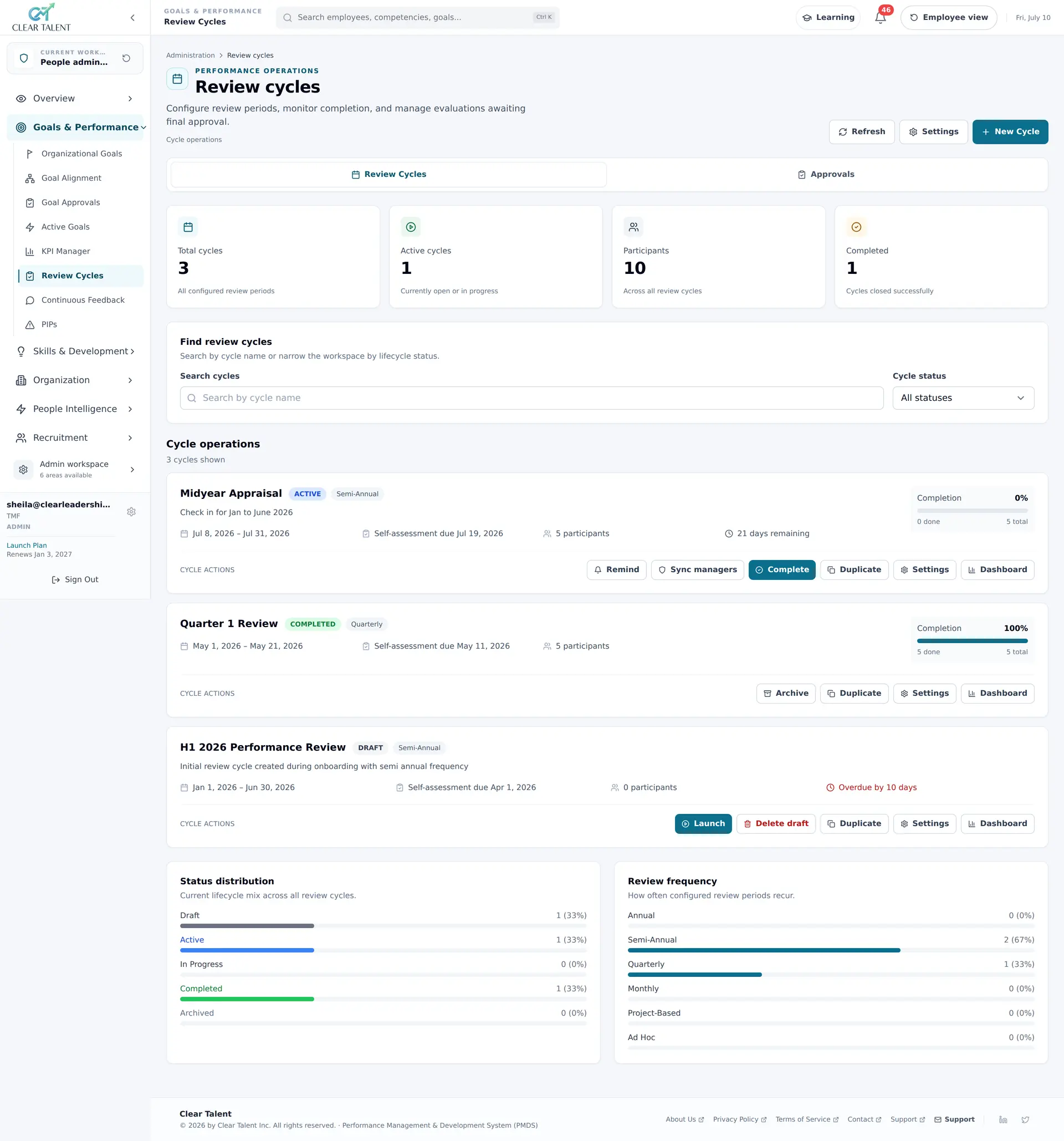
Two managers can read the same rating scale and picture very different levels of performance. Calibration is where an organisation catches that before ratings reach pay, promotion or an employee’s record. CLEAR Talent runs it as a stage of the review cycle, from the evidence already in the platform — with bias prompts before ratings are submitted, heatmaps and outlier flags across managers, and an audit trail of every change agreed in the room.
- Ratings across managers
- Heatmaps
- Forced-distribution guardrail
- Optional
- Every rating change
- Logged
Why the same performance earns different ratings
A rating scale describes a standard; managers apply it. One reserves the top band for an ideal nobody meets, another rates the whole team above expectations to protect them, and a third puts nearly everyone in the middle because there is no evidence to defend anything else. Each rating looks reasonable on its own. Place the teams side by side and comparable work has earned three different scores.
That difference does not stay in the review. It flows into pay, promotion and succession decisions, and into a record that internal audit, a works council or a later dispute may ask you to explain.
Software will not decide what “exceeds expectations” should mean in your organisation; that is a leadership decision. What performance calibration software removes are the practical reasons a session runs badly: evidence that arrives too late to read, distributions nobody has seen and changes nobody wrote down.
Calibration as a stage of the review, not a separate exercise
In CLEAR Talent, calibration sits in the review cycle after manager review and before the final rating, so it happens while the decision is still live rather than after ratings have been communicated.
One cycle, fixed dates
Self-review, 360° feedback, manager review, calibration, final rating and a signed-off report run as one cycle. Each stage opens and closes on the dates you set, and automated reminders keep it moving.
The evidence travels with the rating
Goal scores roll up from Strategic Linked Goals, competency ratings carry the behavioural evidence behind them and structured 360° input sits alongside, so the room reads the same data the rating was made from.
Inconsistency surfaced before the meeting
Live heatmaps, outlier flags and forced-distribution simulations show where ratings are inconsistent across managers and teams before anything is final.
A record that outlasts the session
Every change is logged with who, what and when, and one-click PDF and Excel exports produce both the pack for the meeting and the record afterwards.
Read the shape of the ratings, not the average
Two teams can share the same average rating while one is solidly competent and the other is split between strong and struggling performers. Calibration starts with how ratings are spread, by manager and by team.
Heatmaps across managers and teams
Ratings by manager and team sit side by side, so a manager who rates everyone highly, or a team rated far below its peers, stands out while there is still time to discuss it.
Forced distribution as a check, not a quota
Simulate a forced distribution to see where ratings cluster. It is an optional guardrail and never mandatory, because a curve enforced as a quota turns calibration into an allocation exercise.
Competency distribution with trends
The team report shows how members score across each competency, with trend analysis, so a cluster at the top of the scale for a capability that is new to most of the team gets questioned.
Completion before conclusions
Assessment coverage sits beside the results, and the competency assessment report shows completion alongside distribution and manager trends, so a report run mid-cycle is not mistaken for the whole population.
Where the calibration pack starts
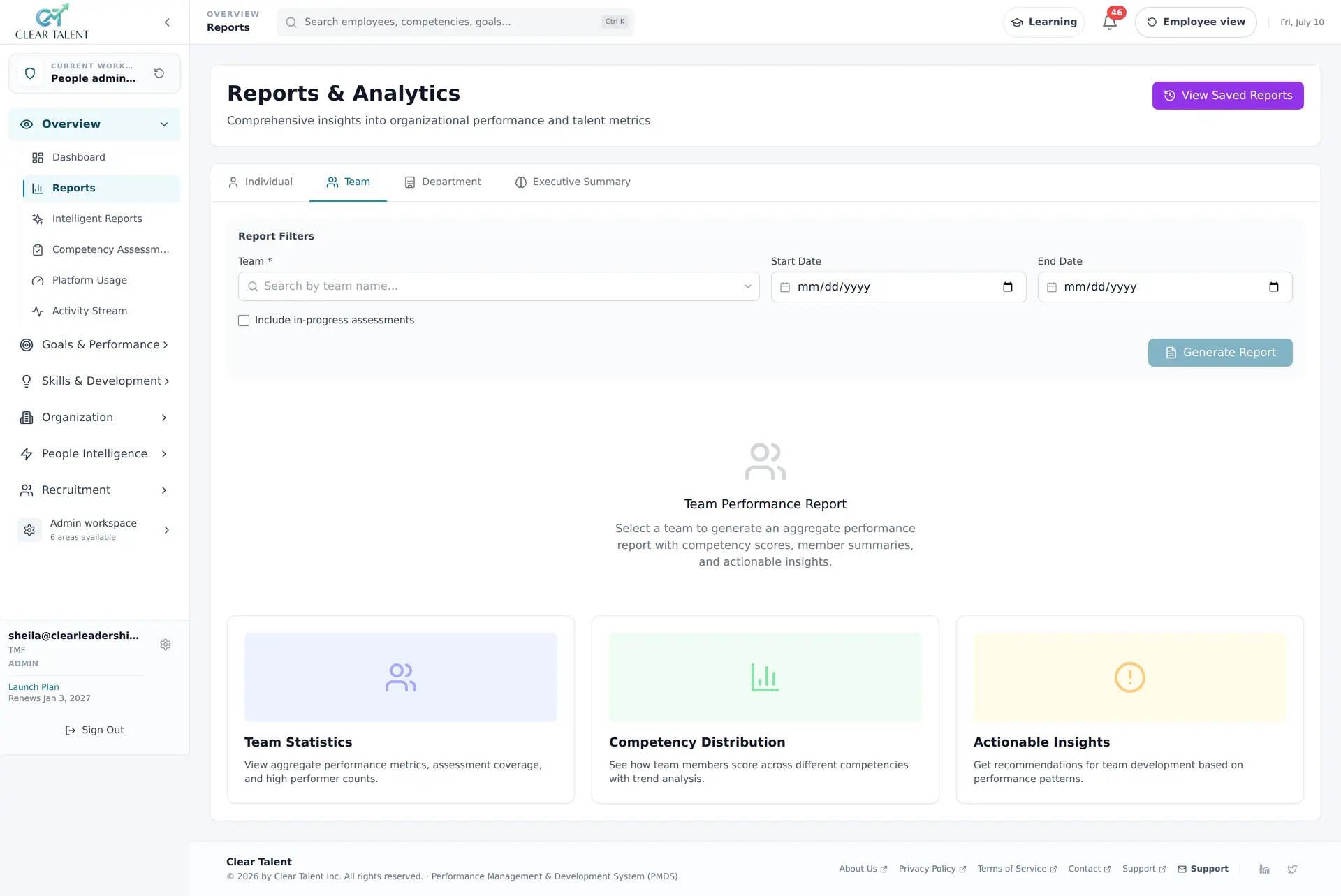
Before the session, HR checks who has been assessed and how their results are spread. The Team tab of Reports & Analytics answers both for one team and one period, so the picture can be circulated before anyone has to defend a rating.
- 1
Team, Start Date and End Date
Pick the team and the period, so the report covers the same people and the same window as the cycle being calibrated.
- 2
Include in-progress assessments
Leave it clear to report on finished assessments only, or tick it to see a cycle part-way through — useful for chasing completion, not for drawing conclusions.
- 3
Team Statistics
Aggregate performance metrics, assessment coverage and high-performer counts: the first check of who has actually been assessed before any result is quoted.
- 4
Competency Distribution
How team members score across each competency, with trend analysis — the shape of the ratings rather than an average that hides it.
- 5
Actionable Insights
Recommendations for team development based on performance patterns, so a gap the session agrees on leads somewhere after calibration.
Recency and leniency flagged before ratings are submitted
Most rating bias is an evidence problem. The last eight weeks are vivid and the first eight months are not, so a strong final quarter can turn an uneven year into “exceeds expectations”. Some managers rate high to protect their team; others rate low to look rigorous.
Before a manager submits, Ava, the AI assistant built into CLEAR Talent, looks for rating patterns that may indicate gender, recency or leniency bias and prompts the manager to look again. It is a prompt, not a verdict: the manager decides whether the pattern reflects bias and whether to change anything, and calibration remains the place where ratings are compared across managers. Every Ava output is labelled and editable, and Ava can be switched off per cycle, team or module.
The best counter to recency is a record kept through the year. Managers log 1-on-1s, development notes and performance-journal observations tagged to competencies as they happen, so the review opens with the period’s evidence already there rather than six weeks of memory.
A manager-comparison workflow that ends in a recorded decision
A manager whose ratings run above their peers may lead a stronger team, or may be applying a different standard; the evidence decides which. An illustrative sequence for working through it in the session:
- 1
Compare like with like
Set a manager’s ratings against peers rating the same roles against the same competencies. The competency assessment report shows manager trends alongside completion and distribution, so leniency, severity and central tendency show up as patterns to discuss.
- 2
Start with the outliers
Work the highest ratings, the lowest and the cases the outlier flags mark, rather than every name in alphabetical order. That is where inconsistency lives, and those are the discussions that deserve the time.
- 3
Ask for evidence, not adjectives
Goal scores, competency ratings with their evidence and anonymised 360° input are already in the platform. The composite rating keeps each part visible, so the room can question a goal score without disturbing the competency ratings beside it.
- 4
Record what changed
Every rating change is written to the audit log against the user who made it, with the before-and-after values. Agree the reason before moving on, so the manager can explain the outcome to the employee in their own words.
From calibrated ratings to the 9-box grid
A talent review should start from performance that has already been calibrated. Re-rating performance around a 9-box grid quietly undoes the session you already ran and introduces a second, undocumented standard.
In CLEAR Talent the 9-box grid draws on the same competency assessments, 360° feedback and performance scores the review cycle produces. Its axes are configurable, it filters live by role family, region or diversity dimension, and every drag-and-drop placement is written to the audit log. It is part of the Talent & Succession Planning module on the Enterprise plan.
An audit trail behind every calibrated rating
A rating that moved in calibration is the one most likely to be questioned later. The audit log records rating changes, approvals, sign-ins and exports against the user responsible, with the before-and-after values on every change, so you can show what moved, who moved it and when.
Each stage closes on the date you set, so once the cycle ends a calibrated rating cannot be quietly amended. One-click PDF and Excel exports give HR the session pack beforehand and the record afterwards, and a roll-up Excel export supports your own analysis of which ratings moved, in which direction and for whom.
Calibration that holds up to GDPR, works councils and pay transparency
In Ireland and across the EU, a calibrated rating is personal data about an identifiable employee, and where it feeds pay it increasingly has to be explained. These are the controls that make those conversations concrete.
CLEAR Talent runs on Google Cloud Platform. If employee data has to stay in a particular region, such as the EU, raise it at the start: regional requirements are agreed for each deployment and confirmed alongside the DPA.
GDPR tooling for performance data
Data subject access request exports, right-to-be-forgotten workflows and a data processing agreement, so a request about a calibrated rating is answered from the system rather than from meeting notes and inboxes.
Role-based access
Access is role-based across administrator, manager and employee roles, with ownership checks on individual records, and managers work within their own reporting line.
Concrete answers for a works council
In some EU countries, Germany and the Netherlands among them, a performance evaluation system can require works council consultation or consent. Fixed stage dates, role-based access and an audit log of every rating change give representatives specific answers; take advice from your employment counsel.
Pay transparency and the EU AI Act
The EU Pay Transparency Directive expects pay progression to rest on objective, gender-neutral criteria, and the EU AI Act treats AI used to evaluate workers’ performance as high-risk. Ratings carry their evidence, Ava’s prompts are labelled and editable, and people make every decision.
A published price list, before you talk to sales
Performance review cycles, where the calibration stage sits, are included on every plan. The Basic plan is USD 39 per month for 1 admin user and 10 staff users, and the Pro plan is USD 295 per month for 3 admin users and 50 staff users, with published rates for each additional user. Annual billing saves 15%, and there is a free 1-month trial.
Not every capability sits on every plan: the AI capabilities differ between plans, and the Talent & Succession Planning module, where the 9-box grid lives, is on the quoted Enterprise plan. Check the plan comparison before you scope a rollout, and raise anything unclear in the demo.
Related solutions
- Employee performance review softwareSelf-review, 360° input, manager review and calibration, combined into one defensible rating.
- AI performance management softwareAva drafts reviews from evidence, summarises 360° feedback and flags potential rating bias. Managers make the decisions.
- Succession planning softwareIdentify and develop successors for critical roles with 9-box grids, readiness ratings and IDPs.
- Performance management software for Ireland and EuropeDSAR exports, erasure workflows, a DPA and 16 languages, with works-council and EU AI Act questions answered plainly.
Guides, walkthroughs and more
Frequently asked questions
Can't find what you're looking for? Talk to a specialist →
What is performance calibration software?
Does calibration in CLEAR Talent mean forced distribution?
How does CLEAR Talent flag rating bias?
Can we show later why a rating changed in calibration?
How does CLEAR Talent handle calibration data under GDPR?
See performance calibration software in action.
Book a live demo with a CLEAR Talent specialist. No generic slide deck—just the platform and a conversation focused on your scenario.